Introducing Sumtracker MCP! Talk with AI to manage your inventory.
You can now connect your Sumtracker account to Claude, ChatGPT, or any AI tool that supports MCP server, and talk to your inventory in plain English. The AI app reads your live Sumtracker data, giving you the answers you need right away without digging through reports.
📊 Ask AI anything about your inventory
Ask questions to AI, and get answers from your Sumtracker account. For example:
- “Which SKUs are below 10 units across all my warehouses?”
- “How many bundles can I build right now with current stock?”
- “Show me yesterday’s Shopify orders that were not fulfilled.”
- “Any sync errors on my channels this week?”
- “Which products should I reorder this week?”
✏️ Make changes to your Inventory just by asking
You can also ask the AI app to make changes for you, like “Add 50 units to SKU ABC-123 in the Texas warehouse as a stock adjustment”. We’re adding more over the coming weeks, including Purchase Orders and Stock Transfers, so you can run more of Sumtracker right from your AI app.
The AI app shows you what it’s about to change and asks you to confirm, so review it before you approve.
🔌 Connect Sumtracker to your preferred AI App in minutes
You can find the steps to connect Sumtracker with Claude, ChatGPT or other AI tools here: How to connect to Sumtracker MCP
⛔️ Easily manage or disconnect AI from Sumtracker
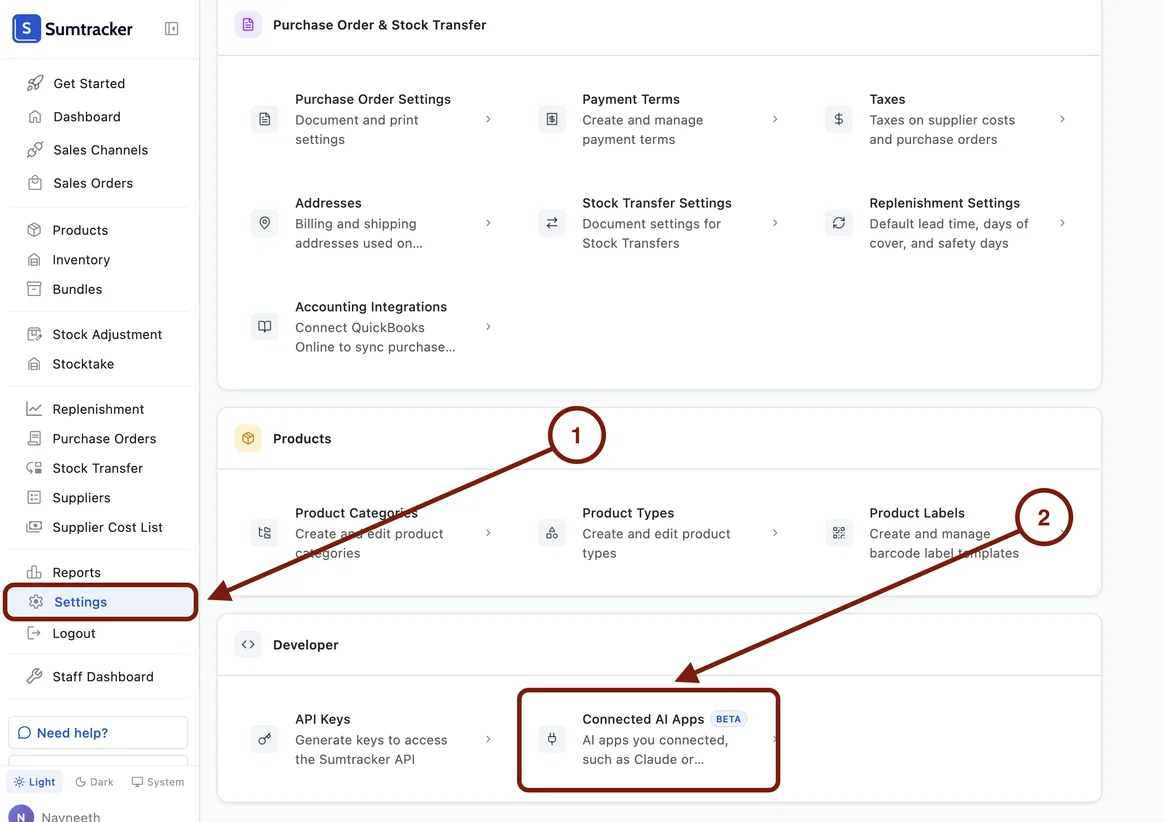
You can disconnect the AI tool from Sumtracker any time by going to Settings > Connected AI Apps.
🔐 User permissions are respected even in your AI tool
The connector works with the permissions of the Sumtracker user who signs in. If your user can only see certain warehouses, the AI app only sees those too. If your user is not permitted to manage/edit Suppliers, the AI app wouldn't be permitted either.
This is just the start, and we have more exciting changes planned for Sumtracker MCP! If you have any questions or feedback about these updates, we’d love to hear from you!